


Hi there.
I was wondering if anyone could clue me in on what is the issue for me.
This is not for Xonotic. But the game I am making it for is working on Darkplaces all the same. So I was hoping you all could share some of your expertise.
I'm working on a map and I got these light shafts that are meant to use "deformVertexes autosprite2".
And they work, sort of. But when I move around the map. They tend to spaz out and reorient themselves violently. I can't seem to find any information on this and I know it should work because the map I am working on is a conversion project. So the material and actual function has worked previously. But not when I make the compile myself. (That being said, I don't have the source files so I had to make a decompile before, so it's possible something is missing, but rest assured I do have the permission of the original author to make this conversion).
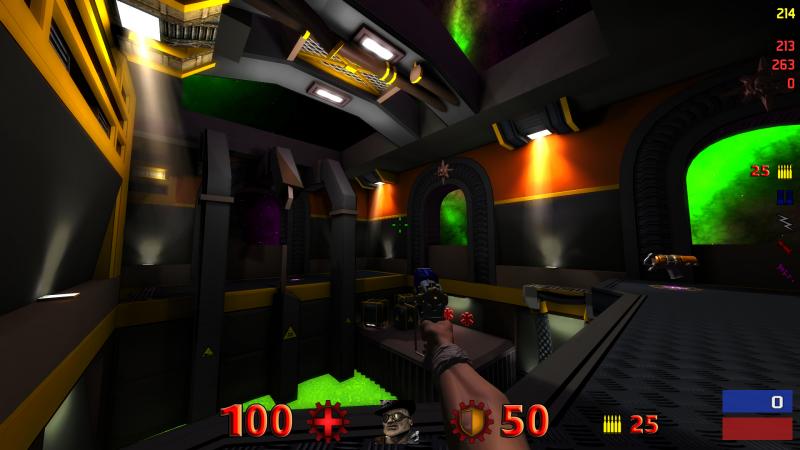 Here they are in place.
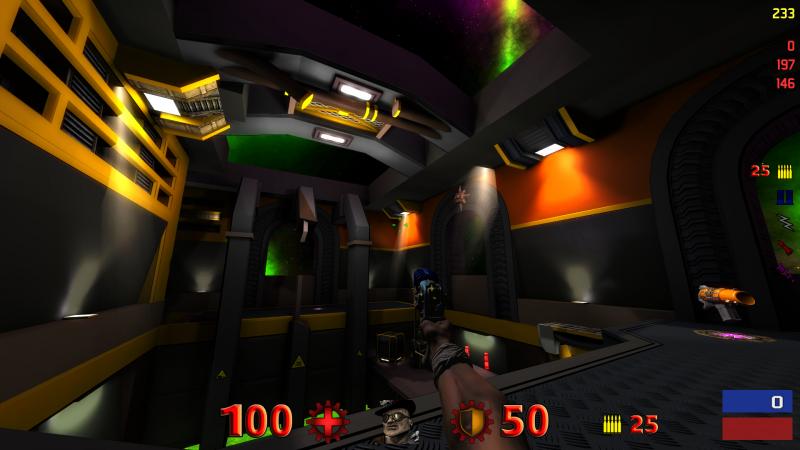 But at some points, they flick out of position and loose orientation.
Here is the material declaration for the light shaft.
Another similar issue, is alphashadows. I just can't get them to work. Doesn't look like the textures which are intended to do it is letting through the light at all. But they are as far as I know properly alpha shaded.
All I can think of right now is that they are in TGA, and possibly it would require them to be in JPG?
Here is the material declaration for the alpha mapped texture.
I was wondering if anyone could clue me in on what is the issue for me.
This is not for Xonotic. But the game I am making it for is working on Darkplaces all the same. So I was hoping you all could share some of your expertise.
I'm working on a map and I got these light shafts that are meant to use "deformVertexes autosprite2".
And they work, sort of. But when I move around the map. They tend to spaz out and reorient themselves violently. I can't seem to find any information on this and I know it should work because the map I am working on is a conversion project. So the material and actual function has worked previously. But not when I make the compile myself. (That being said, I don't have the source files so I had to make a decompile before, so it's possible something is missing, but rest assured I do have the permission of the original author to make this conversion).
Here is the material declaration for the light shaft.
Code:
textures/toxicity/beam1
{
		sort 16
		qer_editorimage textures/pukka3tourney2/s1.jpg
		surfaceparm nonsolid
		surfaceparm trans
		surfaceparm nolightmap
		cull disable
		deformVertexes autosprite2
	{
		clampmap textures/pukka3tourney2/s1.jpg
		blendfunc add
	}
}
Another similar issue, is alphashadows. I just can't get them to work. Doesn't look like the textures which are intended to do it is letting through the light at all. But they are as far as I know properly alpha shaded.
All I can think of right now is that they are in TGA, and possibly it would require them to be in JPG?
Here is the material declaration for the alpha mapped texture.
Code:
textures/decals/grid2b
{
	qer_editorimage textures/decals/grid2_ed.jpg
    	surfaceparm trans
	surfaceparm alphashadow
	surfaceparm playerclip
   	surfaceparm nonsolid
	surfaceparm nomarks
	surfaceparm nodrop
	cull none
	dpoffsetmapping - 8 match8 255
        nopicmip
	{
		map textures/decals/grid2.tga
		rgbGen identity
		depthWrite
		alphaFunc GE128
	}
	{
		map $lightmap
		blendfunc filter
		rgbGen identity
		tcGen lightmap
		depthFunc equal
	}
}
 Removing some sprites doesn't solve it (thought it may be a limitation, but it isn't). For some reason the view position and angle matters. Depending on what your view-angle to the sprite is it deforms weirdly or behaves as expected. Important to note, the sprite geometry doesn't change then (in the case of not working correctly), it is the texture that spins around.
